
MWI Organizational Ombuds Panel Manual: Completing Matters and Visitor Records in Salesforce
In Salesforce, a Matter is a case record documenting the visitor’s concern, ombuds actions, and outcome. Every Matter created in Salesforce must be associated with a Visitor record. The sections below provide guidance for completing both Matters and their associated Visitor records.
Completing Matters
Use these fields to document the visitor’s concerns, the assistance provided by the ombuds, organizational observations, referrals, and the outcome of the Matter.
MWI Reporting Categories
Select the category or categories that best represent the prominent issues, concerns, questions, or feedback shared by the visitor.
A single Matter may contain multiple issues and therefore may require multiple MWI reporting categories.
View the MWI Data Categories .
Identity Related / Dimension of Experience
This field helps modify concern categories when there is an added component related to a visitor’s experience, identity, or background.
Example: If a visitor reports racial discrimination, select Discrimination as the reporting category and Race/Ethnicity/Nation of Origin as the identity-related modifier.
Example: If generational differences contribute to a conflict, select Priorities/Values/Beliefs and then choose Age/Generation or Culture/Style as the modifier.
Summary of Issues
Provide a brief paragraph describing the visitor’s concern or concerns.
Include enough detail to support the selected reporting categories while maintaining confidentiality.
Theme / Pattern / Trend
If the Matter reflects a theme, pattern, or trend you have observed in previous Matters, briefly describe it.
If no pattern exists, leave the field blank.
Examples:
- Managers not being open to constructive feedback.
- Lack of cultural sensitivity from managers.
- Unclear application of work-from-home policy.
Direction of Concern
Select the direction of the relationship between the visitor and the individuals, groups, or systems involved.
- Up: Concern involves an individual, group, or office with authority over the visitor.
- Down: Concern involves an individual or group over whom the visitor has authority.
- Parallel: Concern involves individuals or groups at the same level.
- Self: Concern is intrapersonal.
- Other: Concern involves policies, systems, or other factors.
Level of Organizational Impact
Select the level of impact based on the number of people affected, severity of the issue, and level of involvement.
- High: Affects many constituents, involves senior leadership, includes significant policy or legal concerns, or presents substantial reputational, financial, or mission-related risk.
- Medium: Affects multiple constituents, involves mid-level leadership, or includes some policy concerns.
- Low: Involves a single visitor or has minimal impact on others.
Type of Organizational Impact
Select all categories that describe how the visitor’s concern is affecting, or could affect, the organization.
If no listed category applies, select Other and describe the impact in the designated field.
Ombuds Actions
Select all actions taken to assist the visitor.
If you took an action that is not represented in the available selections, choose Other Action and describe the activity performed.
Matter Outcome
Provide a brief paragraph describing what the visitor ultimately did and how the situation changed.
Sample outcome:
If the visitor becomes unresponsive and the outcome is unknown, enter Unknown.
What the Ombuds Did to Help the Visitor
Use this field to provide additional detail beyond the selected Ombuds Actions.
Example:
Referred Visitor To
Document any institutional resources, offices, programs, or services to which the visitor was referred.
If no referral was provided, enter N/A.
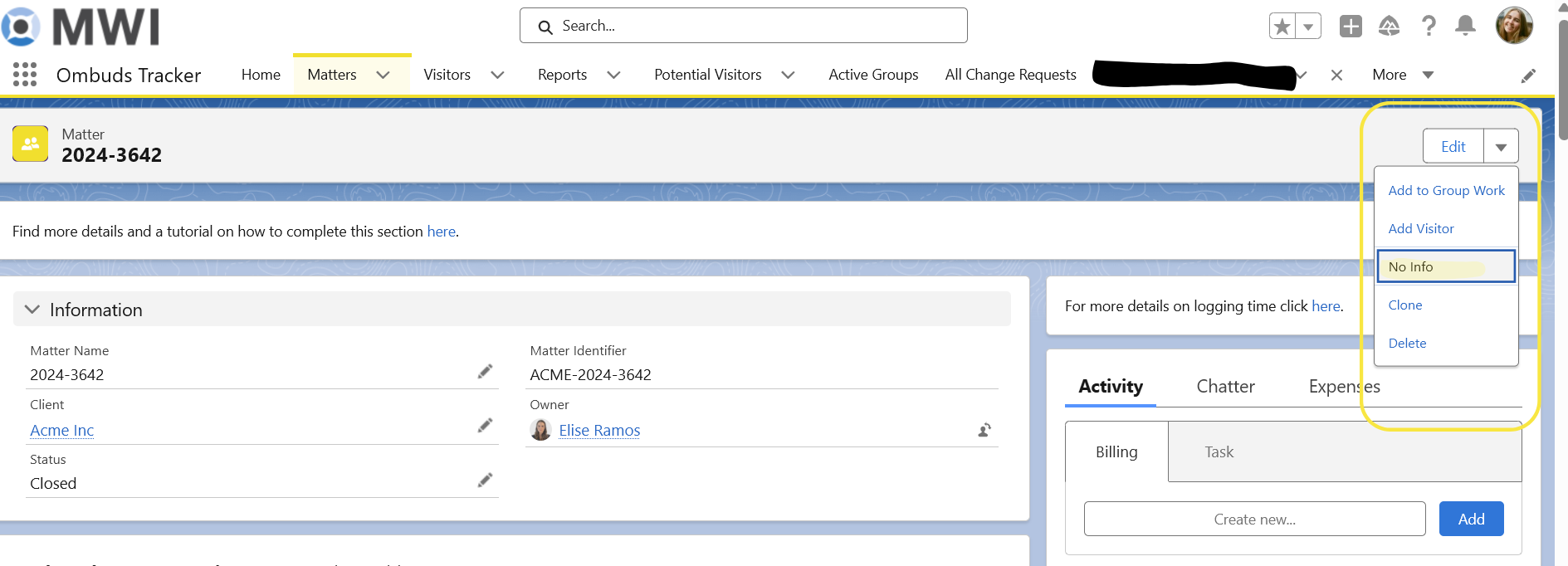
Closing a Matter: “No Info” Button
Use the No Info button only when you have no information about the visitor or the situation that prompted the outreach.
When this option is selected, the Matter can be closed without completing Matter fields, and the visitor will not receive a feedback survey.
If you have any information from an initial contact, voicemail, email, or web submission, complete the Matter to the best of your ability using available information. For fields that cannot be completed, select N/A when appropriate.
Completing Visitor Records
Use these fields to complete the Visitor record associated with the Matter. Enter as much information as is reasonably available while honoring the visitor’s privacy and preferences.
Contact Information
Enter as much visitor information as possible into the Contact Information section.
- All identifying information will be redacted once the Matter is closed.
- A last name is required to begin creating a Visitor record.
- If a visitor wishes to remain anonymous, enter Anonymous in the Last Name field.
- Additional information such as an email address and phone number may be added later.
Find Visitor Information
Salesforce includes a feature that allows you to pull visitor information from the Potential Visitor database.
- Open the Matter.
- Click the dropdown arrow next to the Edit button.
- Select Find Visitor Information.
- Search using the visitor’s name or email address.
Contact Preference
Select the visitor’s preferred method of communication.
Contact preference also determines how visitor surveys are delivered after a Matter is closed.
Return Visitor
If a visitor contacts you after a previous Matter, mark them as a Return Visitor.
Indicate whether the visitor is returning regarding:
- The same concern discussed previously.
- A completely different concern.
Visitor Submission
If a visitor submits a webform before meeting with the ombuds, their submission will appear in the Visitor Submission field.
Review this information before your initial meeting whenever possible.
Ombuds Notes
The Ombuds Notes field functions as a personal notepad while you are working with a visitor.
Person of Concern
A Person of Concern is an individual whose behavior may have negatively impacted one or more visitors and whose conduct may not otherwise be adequately addressed through existing organizational channels.
Identifying a Person of Concern helps the ombuds team and MWI evaluate whether broader organizational attention may be warranted.
Consider using this field when:
- Visitors are afraid to raise concerns directly.
- Prior interventions have not been effective.
- Formal processes appear ineffective or are perceived as protecting the individual.
- The behavior is sufficiently serious that organizational leaders may need to be informed.
Visitor Feedback
Use this field to record verbal or written feedback shared by visitors regarding their experience with the ombuds resource.
Visitors will also receive a formal feedback survey when their Matter is closed.
Referral Details
Ask visitors how they learned about the ombuds resource.
Record that information in the Referral Details field to help track outreach and engagement efforts.
Demographics
If demographic information is not available through the Find Visitor Information feature, ask the visitor how they identify in the following areas:
- Race or ethnicity
- Gender
- Generation or age group
- Length of employment at their institution
Explain that demographic information is anonymized and will not be shared with the client in a way that could identify the visitor.